Customer Intelligence Graph (view)
The Customer Intelligence Graph view (also shown as Context Graph) is an admin-facing window into everything FunnelStory has already computed about your customers — where the data came from, what it learned, and how fresh it is. It makes the Customer Intelligence Graph concept concrete: you can see the graph's coverage across your book, watch an account's graph grow week by week, and follow a single conversation all the way to an action.
This view is for workspace admins only and is rolling out per workspace — talk to your FunnelStory contact if you don't see it. Find it at Configuration → Customer Intelligence Graph. A Presentation mode toggle hides account names so you can share your screen safely; the counts don't change.
Workspace overview
The landing view summarizes the whole workspace:
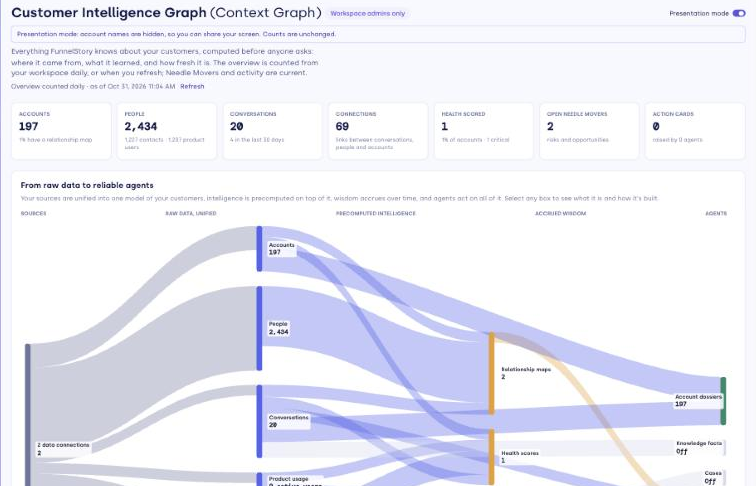
- Tiles — counts for Accounts, People, Conversations (and the last 30 days), Connections between them, Health scored, Open Needle Movers, and Action Cards.
- From raw data to reliable agents — a flow diagram across five layers: your Sources, Raw data, unified, Precomputed intelligence, Accrued wisdom, and Agents. Select any box to read what it is and how it's built.
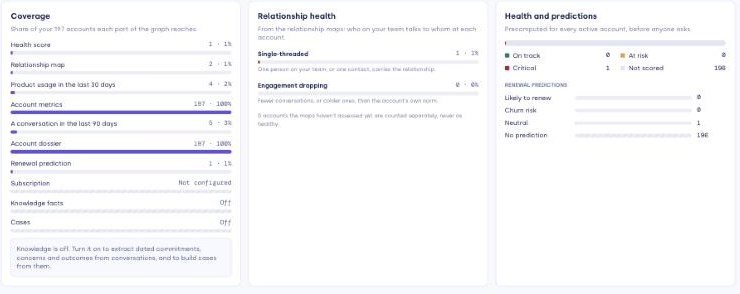
- Coverage — the share of accounts each part of the graph reaches: health score, relationship map, recent product usage, account metrics, a recent conversation, dossier, renewal prediction, subscription, and more.
- Relationship health, Health and predictions, and Open Needle Movers by type — distributions across your accounts.
- The graph keeps growing — weekly bars for conversations, needle movers, and action cards.
- Freshness — when each part of the graph last updated.
- Where your graph is thin — your highest-ACV accounts with no conversation in the last 90 days, so you can see where coverage is weakest.
How current it is
Under the title, the view shows "Overview counted daily · as of <date>" with a Refresh button. The overview and the thin-accounts list are counted once a day and stored; Refresh recounts them now (on large workspaces this can take a little while). Open Needle Movers and the activity bars are always live, so they aren't tied to that daily timestamp.
A single account's graph
Open any account from the overview (for example, from Where your graph is thin, or the "Explore a well-connected account" link) to see its graph, with three tabs:
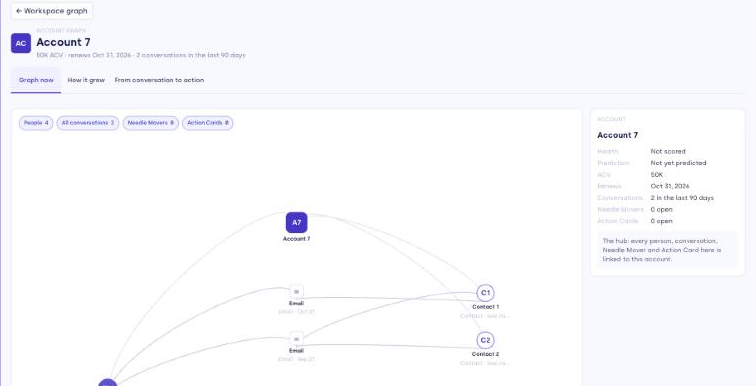
- Graph now — an interactive node-link graph of the account: its people, conversations, needle movers, and action cards, with filter chips and a detail panel for any node. Line weight shows relationship strength, and color shows sentiment. If nothing has connected in the last 90 days, a thin-account state explains why and suggests what to check (domain/CRM matching, connecting the right sources, assigning an owner).
- How it grew — a week-by-week replay of the account's stored weekly relationship-map snapshots (about the last 16 weeks). Play it, or step through the weeks, to see how contacts and conversations accumulated.
- From conversation to action — a stepped chain that follows one open needle mover from the conversation that raised it through to the action cards and memory it produced, with a link back to the source at each step. It shows how intelligence is computed before anyone asks.
Related
- Customer Intelligence Graph (concept) — what the graph is and why it exists.