Grounding agents in your product docs
When you bring in your product documentation — through the Documentation site or Uploaded documents connections, or a Product Docs data model over a warehouse — FunnelStory makes it searchable by your AI Agent flows and by MCP clients. Reach for this when you want an agent to reason about your own product accurately: name features the way your docs do, point to the right setting or error, and cite where it came from instead of guessing.
How it works
Your documentation is stored in the workspace semantic database as the table product_docs_sources — one row per document, whether it was crawled, uploaded, or mapped in from a warehouse:
| Column | Description |
|---|---|
id | Document identifier (read a document by this). |
title | The document's title. |
url | Where it came from (a crawled page's URL, the uploaded file, or a value your model maps in). |
content | The full document text — often very large. |
kind | page (crawled), file (uploaded), or doc (from a Product Docs model). |
product_id | Usually empty; most documents aren't scoped to a single product. |
updated_at | When the document was last ingested. |
There's no pre-built summary or "map" — agents search the documents themselves with SQL, the same way they query the rest of the semantic database.
Because a single document can be megabytes, the pattern is find, then read: search titles and short snippets first (with a LIMIT), then read around the matches by id — never select a whole content column, and don't filter by product_id (most documents leave it empty, so filtering hides matches).
-- 1. Find: search for matches, return a short snippet, not the whole document
SELECT id, title,
       substr(content, max(1, instr(lower(content), lower('timeout')) - 150), 300) AS snippet
FROM product_docs_sources
WHERE content LIKE '%proxy%' AND content LIKE '%timeout%'
LIMIT 20;

-- 2. Read: pull a window around the match in the document you chose, by id
SELECT substr(content, max(1, instr(lower(content), lower('proxy timeout')) - 500), 3000)
FROM product_docs_sources
WHERE id = '...';
In an AI Agent flow
On an AGENT step (see LLM steps):
- Grant a query tool. Attach a
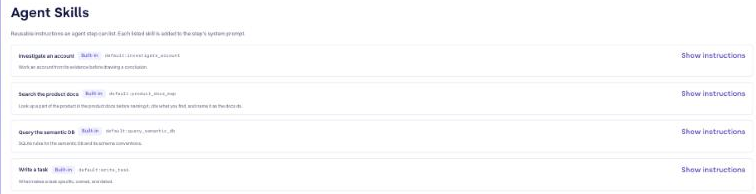
semantic.querytool so the model can run SQL. Scope it toproduct_docs_sourceswhen the step should only read the docs. - Attach the "Search the product docs" skill. This built-in skill teaches the model the find-then-read pattern above — searching several phrasings, keeping results small, and reading by
id— so you don't have to spell it out in the prompt. Pick it from the built-in skills on the step.
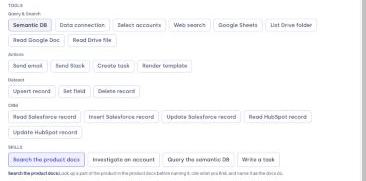
The agent then searches for the customer's wording, the product's own names for its parts, and the exact error or setting, reads the documents that bear on the question, and answers with a citation to the source url.
FunnelStory's own built-in needle mover investigation works this way: it reads your product docs to say whether a reported problem maps to an existing capability, a documented limitation, or something not covered — so it's a working example of the same wiring.
Through MCP
An MCP client reaches the same content with the query_semantic_db tool — product_docs_sources is one of the queryable tables. Read the schema (file://semantic/schema.sql) and usage (file://semantic/usage.md) resources first, then use the same find-then-read pattern.
Searching well
The quality of the answer depends on how the docs are searched, so a few habits matter:
- Try several phrasings before concluding something isn't documented — the customer's words, the product's names for its parts, and the exact error, setting, or command. Search is case-insensitive but literal; it doesn't know synonyms.
- "Not found in the product docs" is not evidence of absence. It never means a capability is unsupported or impossible — only that the search didn't surface it.
- Name parts as the docs do, and cite the source. Ground every product claim in a document and link its
url, rather than paraphrasing from memory.
Related
- Put Your Product Docs to Work — the playbook for using connected docs across needle movers, outcome agents, your own flows, and MCP.
- Documentation site and Uploaded documents — connect the docs in the first place.
- Functions reference — the
semantic.queryfunction. - Available MCP tools —
query_semantic_dband the semantic database.