Gainsight
The Gainsight connection uses your Gainsight tenant domain and access key to query Gainsight’s MDA/API from FunnelStory’s model layer (virtual tables over HTTP), similar to other analytical, query-shaped sources. After the connection is saved, you configure data models in the model builder—Gainsight uses GS block queries.
What FunnelStory uses it for
- Data models — Gainsight objects (timeline, company, and others) are exposed through models you define; map fields and align identifiers with CRM keys where your workspace needs a single account view.
Before you connect
- Obtain a Gainsight
access_keywith API access to the objects you need. - Know your Gainsight
domain(API host / tenant identifier as provided by Gainsight—often the subdomain portion used in API URLs).
Add the connection in FunnelStory
-
Open Configuration → Connections → Add connection, then choose Gainsight.
-
Complete the fields in the connection form:
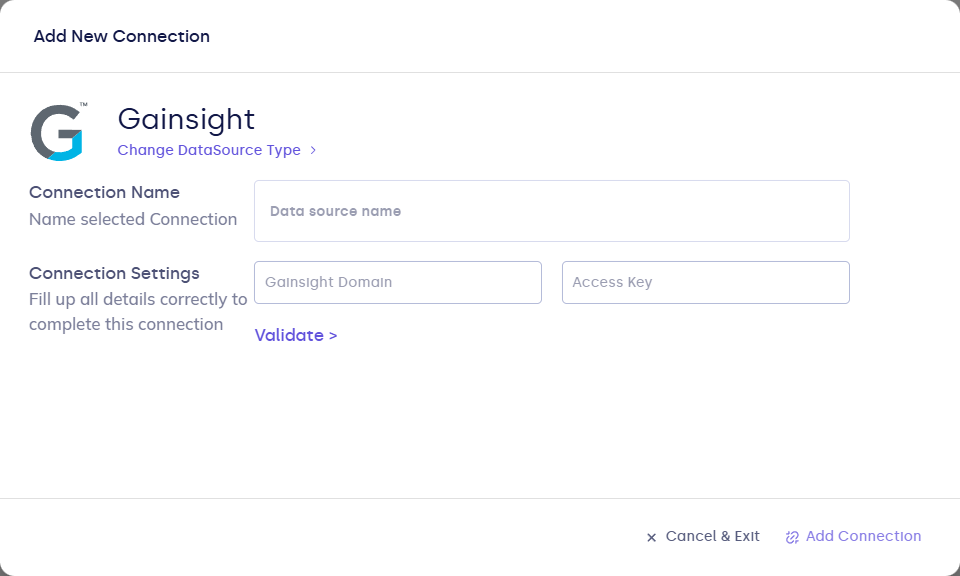
| Field | Description |
|---|---|
| Connection name | Display name. |
| domain | Gainsight API domain / tenant host fragment. |
| access_key | Gainsight API access key. |
- Click Validate, then Add Connection.
After you connect
In the model builder, add or edit models that use this connection: configure GS blocks (endpoint and body), map columns to FunnelStory properties, and refresh on schedule. See Writing queries for Gainsight block format.