Mailgun
Connect Mailgun so your workspace can send email through your Mailgun account. Messages are sent from domains you configure and verify in Mailgun (for example mg.yourcompany.com)—not from FunnelStory’s domain. This connection validates your domain and API credentials; workflow actions use them to deliver mail on your behalf.
What FunnelStory uses it for
- Workflow and product email — Email actions in workflows (and similar features) can target this connection. Set From to an address on your Mailgun sending domain.
Before you connect
- In Mailgun, add and activate a sending domain and create a private API key.
- Choose the correct
base_url(include the/v3segment as in Mailgun’s documentation):- US:
https://api.mailgun.net/v3 - EU:
https://api.eu.mailgun.net/v3
- US:
- Validation calls Mailgun’s API to confirm the domain is active; inactive domains fail Validate.
Add the connection in FunnelStory
-
Open Configuration → Connections → Add connection, then choose Mailgun.
-
Complete the fields in the connection form:
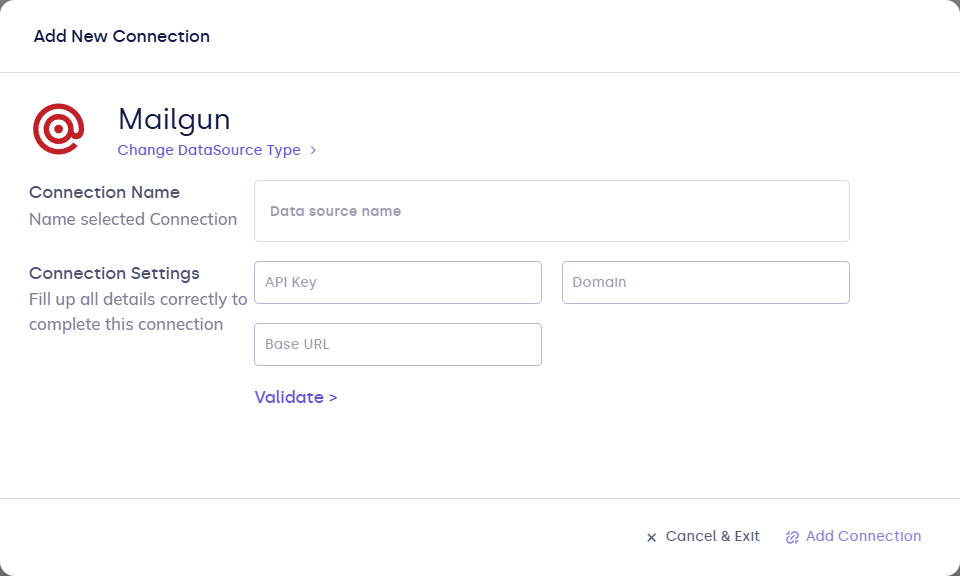
| Field | Description |
|---|---|
| Connection name | Display name. |
| api_key | Mailgun private API key. |
| domain | Mailgun sending domain name. |
| base_url | Mailgun API base URL (US or EU, with /v3). |
- Click Validate, then Add Connection.
After you connect
- Select this connection in workflow email steps (or other supported email features) and use From addresses on your verified Mailgun domain.
- Use Refresh on the connection as needed for your workspace.