Postmark
Connect Postmark so your workspace can send email through your Postmark server. Recipients see messages from sender addresses and domains you verify in Postmark—not from FunnelStory. FunnelStory stores your Server API token (server token), calls Postmark to send from workflows, and can ingest Postmark webhooks so delivery, opens, clicks, and related events show up in the product when webhooks are pointed at your workspace.
What FunnelStory uses it for
- Workflow and product email — Email actions in workflows use this connection’s server token to send via Postmark. You set From in the workflow; it must be allowed for your Postmark Server (verified sender or domain).
- Opens and link tracking — Outbound sends enable Postmark open and link tracking so webhook events can reflect engagement when webhooks are configured.
- Webhook analytics — Postmark can POST events to FunnelStory (for example delivery, open, click).
Validate calls Postmark’s outbound stats API with your token—if that succeeds, the token can reach Postmark’s API.
Before you connect
- In the Postmark UI, open the Server you use for transactional (or outbound) mail and copy the Server API token (FunnelStory field
server_token). - Verify every From address or domain you plan to use, per Postmark’s requirements.
- For webhooks, plan the HTTPS URL FunnelStory exposes for your workspace and connection (pattern:
/api/webhooks/{workspace_id}/data_connections/{data_connection_id}/postmark). Enable the event types you care about in Postmark (see Postmark email webhooks).
Add the connection in FunnelStory
-
Open Configuration → Connections → Add connection, then choose Postmark.
-
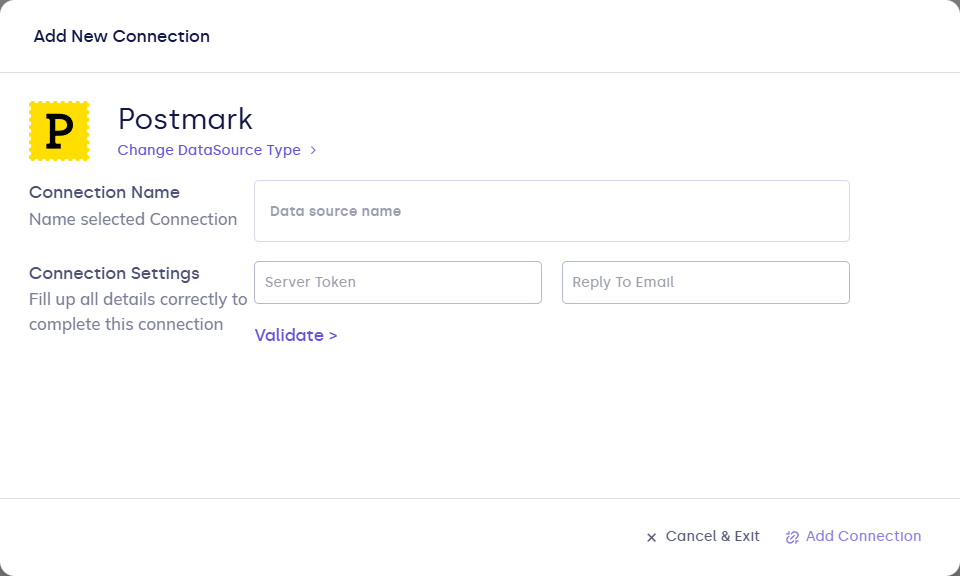
Complete the fields in the connection form:
| Field | Description |
|---|---|
| Connection name | Display name in FunnelStory. |
| server_token | Postmark Server API token for the server that will send mail. |
| reply_to_email | Optional. Default Reply-To for sends using this connection when the workflow does not override it. |
- Click Validate, then Add Connection.
After you connect
- In workflows (or other email features), choose this connection and a From address Postmark accepts.
- In Postmark, add a webhook targeting your workspace URL for this connection so Delivery, Open, Click, and other supported events reach FunnelStory.