Amazon Athena
The Amazon Athena connection lets FunnelStory run queries in your AWS account against data in S3 via Athena, so data models can use curated tables in the AWS Glue Data Catalog (or supported catalogs).
What FunnelStory uses it for
- Data models — Athena SQL (Presto/Trino-flavored) over cataloged tables.
Before you connect
- IAM — Provide AWS credentials (access key + secret, or the mechanism your FunnelStory workspace supports) for an IAM principal that can:
- Start and read Athena queries (
athena:StartQueryExecution,athena:GetQueryResults, etc., as required by your setup). - Read the underlying S3 data and Glue catalog objects.
- Start and read Athena queries (
- S3 query results location — Athena needs a bucket/prefix for query results (often the same path your Athena workgroup or admin expects).
- Cross-account access (if applicable) — If your org uses role assumption, have Role ARN and External ID ready; leave blank when using access keys only.
Add the connection in FunnelStory
-
Open Configuration → Connections → Add connection, then choose Amazon Athena.
-
Complete the fields in the connection form:
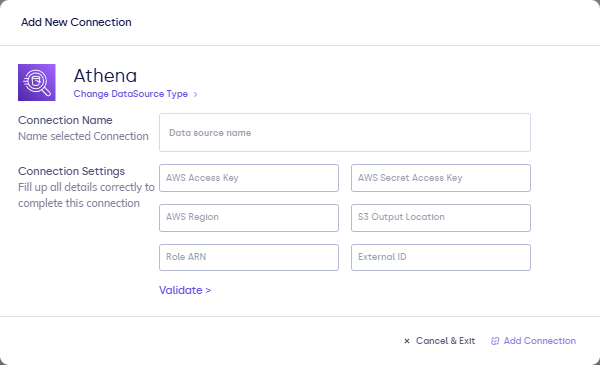
| Field | Description |
|---|---|
| Connection name | Display name in FunnelStory. |
| AWS Access Key / AWS Secret Access Key | IAM credentials with permission to run Athena queries and read the underlying S3 data and Glue catalog. |
| AWS Region | Region for Athena (for example us-east-1). |
| S3 Output Location | s3://bucket/prefix/ where Athena writes query results. |
| Role ARN (optional) | IAM role to assume when your workspace uses cross-account or role-based access. |
| External ID (optional) | External ID for the trust relationship, if your admin requires it. |
- Click Validate, then Add Connection.
After you connect
Use Athena SQL in models. Large scans can incur AWS costs; scope queries to the partitions and tables you need. See Writing queries.
Related links
- Data connections overview
- Amazon S3 (if you also ingest files directly)