MongoDB
The MongoDB connection lets FunnelStory read documents from your MongoDB databases to power data models. Queries use FunnelStory’s MQL block format in the model query step (JSON describing database, collection, filter, and limits)—not ad hoc SQL against Mongo.
What FunnelStory uses it for
- Data models — Define what to pull from each collection and map returned fields to FunnelStory properties.
Before you connect
- Connection string — Have your MongoDB URI ready (
mongodb://ormongodb+srv://), including auth database and TLS parameters if you use Atlas or enforced TLS. - User — A read-only user scoped to the databases and collections FunnelStory should access.
- Network — Allow FunnelStory’s static egress IPs (Allowed IP addresses) or use Atlas IP allowlist / peering as required.
Add the connection in FunnelStory
-
Open Configuration → Connections → Add connection, then choose MongoDB.
-
Complete the fields in the connection form:
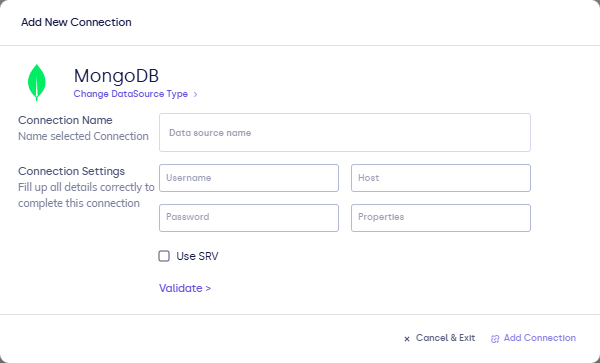
| Field | Description |
|---|---|
| Connection name | Display name. |
| Connection URI | Full MongoDB connection string (or split host/user/password if the UI separates them). |
| Database (if asked separately) | Default database name for validation. |
- Click Validate, then Add Connection.
After you connect
In the model query step, use the MQL block format documented in Writing queries.