MySQL
The MySQL connection lets FunnelStory run read-only SQL against your MySQL database to power data models—accounts, users, billing tables, or any view you maintain for analytics.
What FunnelStory uses it for
- Data models — SQL queries in the model builder, validated against your instance, with column mapping to FunnelStory properties.
Before you connect
- Network — Allow inbound access from FunnelStory’s static egress IPs (Allowed IP addresses), or use an SSH tunnel.
- Permissions — Use a user with SELECT only on the schemas or views FunnelStory should read.
Add the connection in FunnelStory
-
Open Configuration → Connections → Add connection, then choose MySQL.
-
Complete the fields in the connection form:
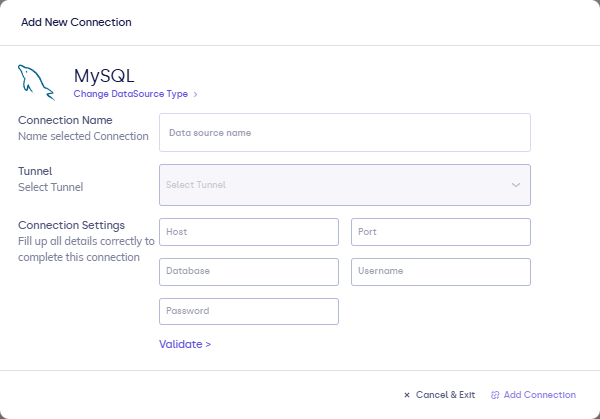
| Field | Description |
|---|---|
| Connection name | Display name in FunnelStory. |
| Host | Server hostname or IP. |
| Port | MySQL port (often 3306). |
| Database | Database name. |
| Username | MySQL user. |
| Password | MySQL password. |
| SSH fields (optional) | If the form offers tunnel parameters; otherwise configure SSH tunnels separately. |
- Click Validate, then Add Connection.
After you connect
Use the connection when configuring models. SQL follows MySQL syntax. See Writing queries for types and timestamps.