Amazon Redshift
The Amazon Redshift connection lets FunnelStory query your Redshift cluster or Serverless workgroup with read-only SQL to power data models—often used for warehouse-native account and revenue facts.
What FunnelStory uses it for
- Data models — PostgreSQL-compatible SQL against tables and views you expose to the FunnelStory database user.
Before you connect
- Network — The cluster must accept connections from FunnelStory’s static egress IPs (Allowed IP addresses), or you route access via a network path your team manages (for example VPN + bastion patterns may require SSH tunnels to an intermediate host).
- User — Create a Redshift user with
SELECTon the schemas FunnelStory should read (no write or admin rights required).
Add the connection in FunnelStory
-
Open Configuration → Connections → Add connection, then choose Amazon Redshift (or Redshift as labeled).
-
Complete the fields in the connection form:
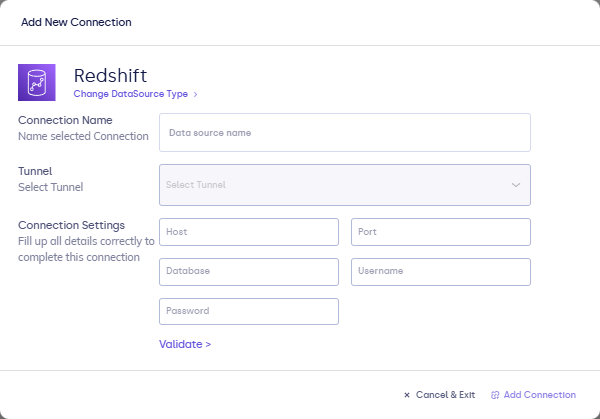
| Field | Description |
|---|---|
| Connection name | Display name. |
| Host | Redshift endpoint hostname. |
| Port | Usually 5439. |
| Database | Database name. |
| Username | Redshift user. |
| Password | Redshift password. |
- Click Validate, then Add Connection.
After you connect
Attach to models and write Redshift-compatible SQL. See Writing queries.